Dashboard
The Dashboard serves as the main overview panel of the courier service application, presenting key business metrics such as total companies, plans, subscriptions, and overall subscription revenue. It provides administrators with quick insights into system performance and user activity. Additionally, it displays recent company registrations and subscription details, helping in monitoring growth and operational trends in real time.
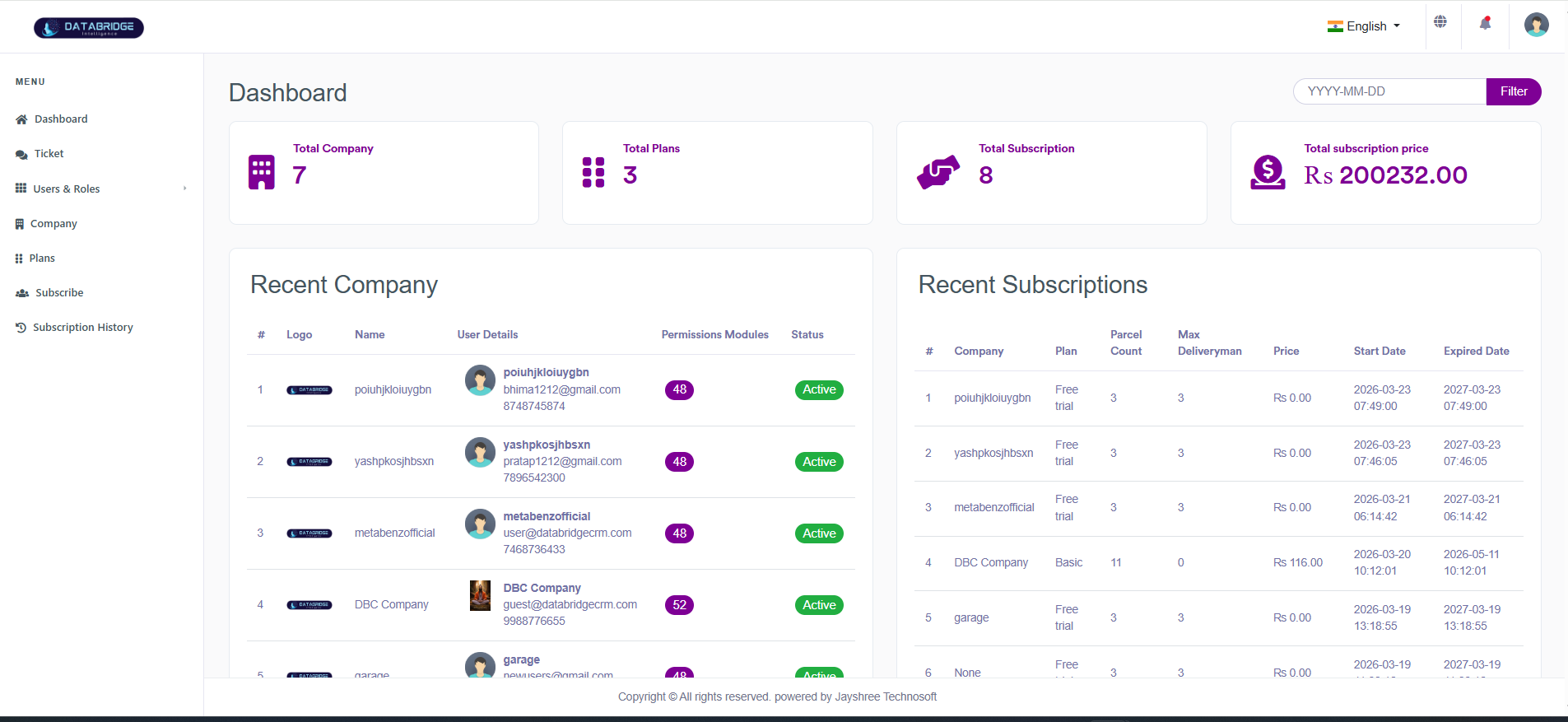
Dashboard (Courier Services Web Application):
The Dashboard provides a centralized overview of the courier service system, displaying key metrics such as total companies, available plans, active subscriptions, and overall revenue. It also highlights recent company registrations and subscription activities, enabling administrators to quickly monitor system performance and business growth.
Features:
-Displays key statistics (Total Companies, Plans,
Subscriptions, Revenue)
-Shows recent company registrations with user details and status
-Displays recent subscription details including plan, price, and validity
-Date filter for viewing data based on specific time periods
-Quick overview of system activity and business insights
Functionality:
-Fetches and displays real-time data for companies, plans, and subscriptions
-Allows filtering of dashboard data using date selection
-Provides visibility into recent activities for quick monitoring
-Helps administrators track performance, user growth, and revenue trends
-Acts as the main control panel for managing and analyzing the courier system
The Dashboard provides a centralized overview of the courier service system, displaying key metrics such as total companies, available plans, active subscriptions, and overall revenue. It also highlights recent company registrations and subscription activities, enabling administrators to quickly monitor system performance and business growth.
Features:
-Displays key statistics (Total Companies, Plans,
Subscriptions, Revenue)
-Shows recent company registrations with user details and status
-Displays recent subscription details including plan, price, and validity
-Date filter for viewing data based on specific time periods
-Quick overview of system activity and business insights
Functionality:
-Fetches and displays real-time data for companies, plans, and subscriptions
-Allows filtering of dashboard data using date selection
-Provides visibility into recent activities for quick monitoring
-Helps administrators track performance, user growth, and revenue trends
-Acts as the main control panel for managing and analyzing the courier system
Tickets
The Tickets module is used to manage support requests and issues within the courier service application. It allows users to raise tickets related to services, and administrators to track, prioritize, and resolve them efficiently. The module ensures smooth communication between users and support teams by organizing all queries in a structured and trackable manner.
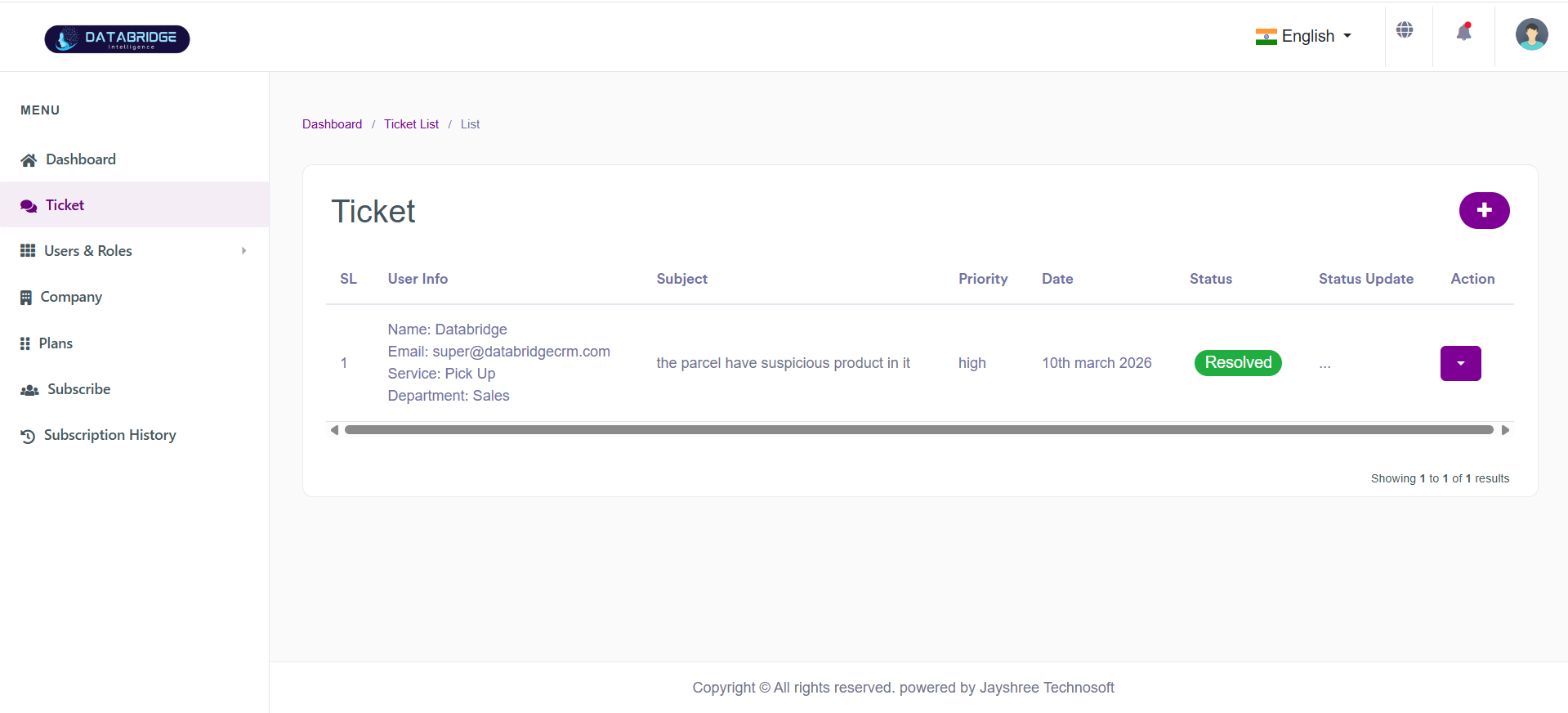
Ticket List:
The Ticket List screen displays all support tickets raised within the system, allowing administrators to monitor, track, and manage issues related to courier services. It provides detailed information such as user details, subject, priority, date, and current status.
Features:
-Displays list of all tickets with complete details
-Shows user information (name, email, service, department)
-Displays ticket subject, priority, and date
-Status indicator (e.g., Resolved, Pending)
-Action options for managing tickets
Functionality:
-Fetches and displays all ticket records in a tabular format
-Allows administrators to view and track ticket progress
-Provides status updates and action controls (edit/update/resolve)
-Helps in monitoring customer issues and support performance
The Ticket List screen displays all support tickets raised within the system, allowing administrators to monitor, track, and manage issues related to courier services. It provides detailed information such as user details, subject, priority, date, and current status.
Features:
-Displays list of all tickets with complete details
-Shows user information (name, email, service, department)
-Displays ticket subject, priority, and date
-Status indicator (e.g., Resolved, Pending)
-Action options for managing tickets
Functionality:
-Fetches and displays all ticket records in a tabular format
-Allows administrators to view and track ticket progress
-Provides status updates and action controls (edit/update/resolve)
-Helps in monitoring customer issues and support performance
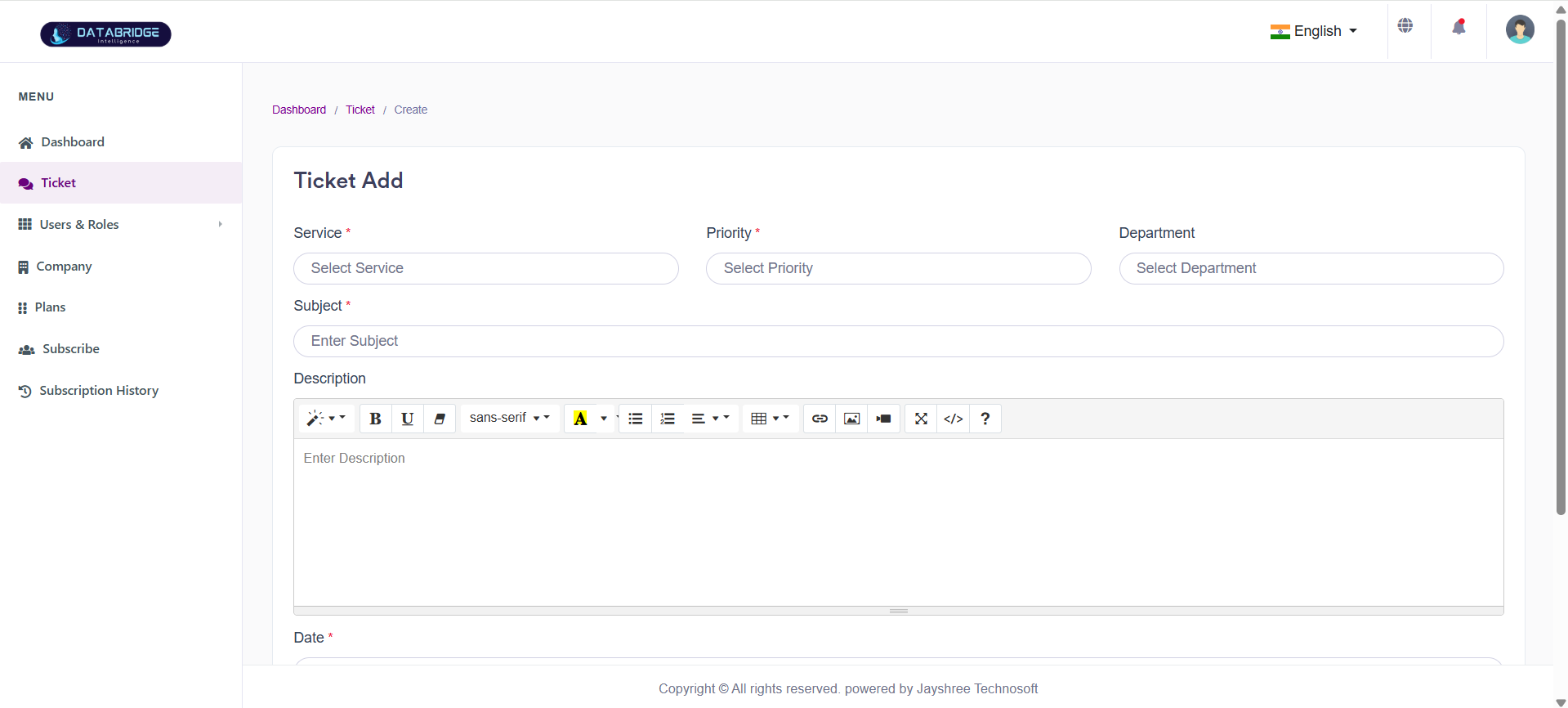
Add Ticket:
The Add Ticket screen allows users or administrators to create a new support ticket by entering relevant details such as service type, priority, subject, and description. It is used to report issues or raise service-related requests.
Features:
-Dropdown selection for Service
-Priority selection (e.g., Low, Medium, High)
-Department selection
-Subject input field
-Rich text editor for detailed description
-Date selection for ticket creation
Functionality:
-Captures ticket details through a structured form
-Validates required fields before submission
-Stores ticket information in the system database
-Enables tracking and resolution workflow after ticket creation
The Add Ticket screen allows users or administrators to create a new support ticket by entering relevant details such as service type, priority, subject, and description. It is used to report issues or raise service-related requests.
Features:
-Dropdown selection for Service
-Priority selection (e.g., Low, Medium, High)
-Department selection
-Subject input field
-Rich text editor for detailed description
-Date selection for ticket creation
Functionality:
-Captures ticket details through a structured form
-Validates required fields before submission
-Stores ticket information in the system database
-Enables tracking and resolution workflow after ticket creation
1
Tickets
2
Right"+"
Users & Roles
The Users & Roles module is used to manage system users and define their access permissions within the courier service application. It allows administrators to create, update, and assign roles to users, ensuring controlled access to different features and maintaining system security.
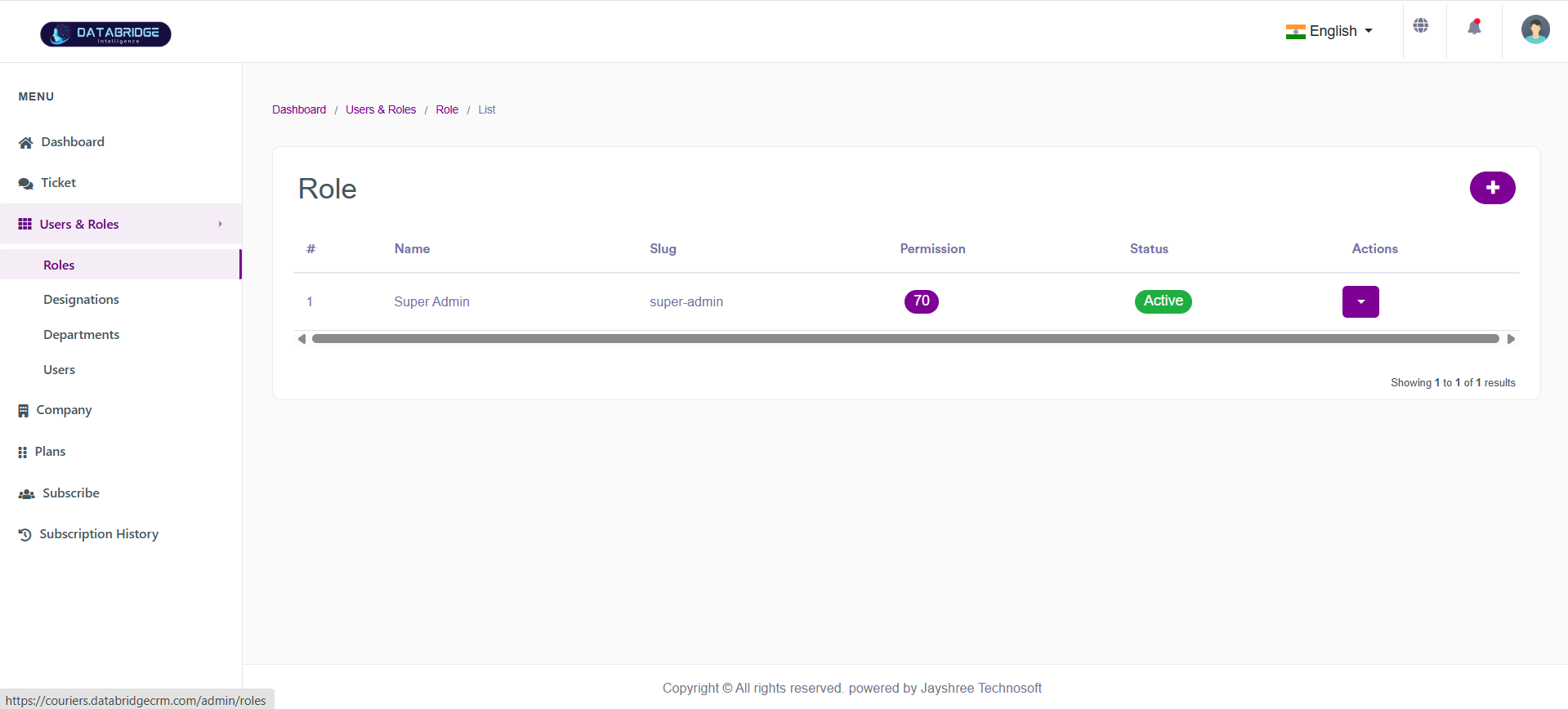
Roles:
This screen displays all the roles created in the system along with their permissions and status. It helps administrators manage role-based access control efficiently by viewing and modifying existing roles.
Features:
-List of all roles with name, slug, and permissions count
-Status indicator (Active/Inactive)
-Action dropdown for edit/delete operations
-Add new role button
Functionality:
-View all existing roles in tabular format
-Create new roles using the add button
-Edit or delete roles from action menu
-Monitor role status and permission allocation
This screen displays all the roles created in the system along with their permissions and status. It helps administrators manage role-based access control efficiently by viewing and modifying existing roles.
Features:
-List of all roles with name, slug, and permissions count
-Status indicator (Active/Inactive)
-Action dropdown for edit/delete operations
-Add new role button
Functionality:
-View all existing roles in tabular format
-Create new roles using the add button
-Edit or delete roles from action menu
-Monitor role status and permission allocation
1
User & Roles
2
Roles
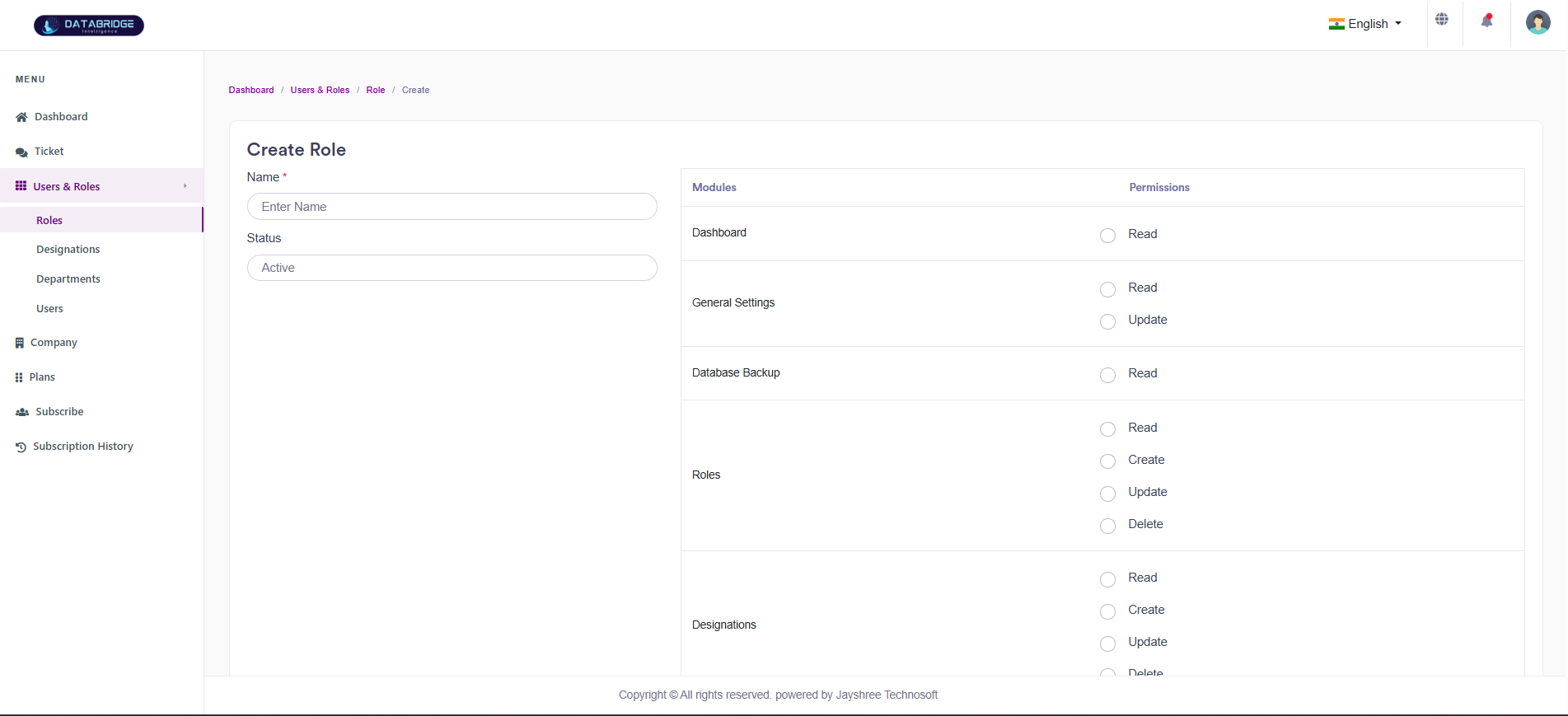
Create Role:
This screen allows administrators to create new roles and assign permissions to different modules. It ensures proper access control across the system.
Features:
-Role name input field
-Status selection (Active/Inactive)
-Module-wise permission assignment (Read, Create, Update, Delete)
-Structured permission panel
Functionality:
-Enter role details and define access levels
-Assign permissions for each module
-Save role with configured permissions
-Ensure controlled user access across system modules
This screen allows administrators to create new roles and assign permissions to different modules. It ensures proper access control across the system.
Features:
-Role name input field
-Status selection (Active/Inactive)
-Module-wise permission assignment (Read, Create, Update, Delete)
-Structured permission panel
Functionality:
-Enter role details and define access levels
-Assign permissions for each module
-Save role with configured permissions
-Ensure controlled user access across system modules
1
User & Roles
2
Roles
3
Right"+"
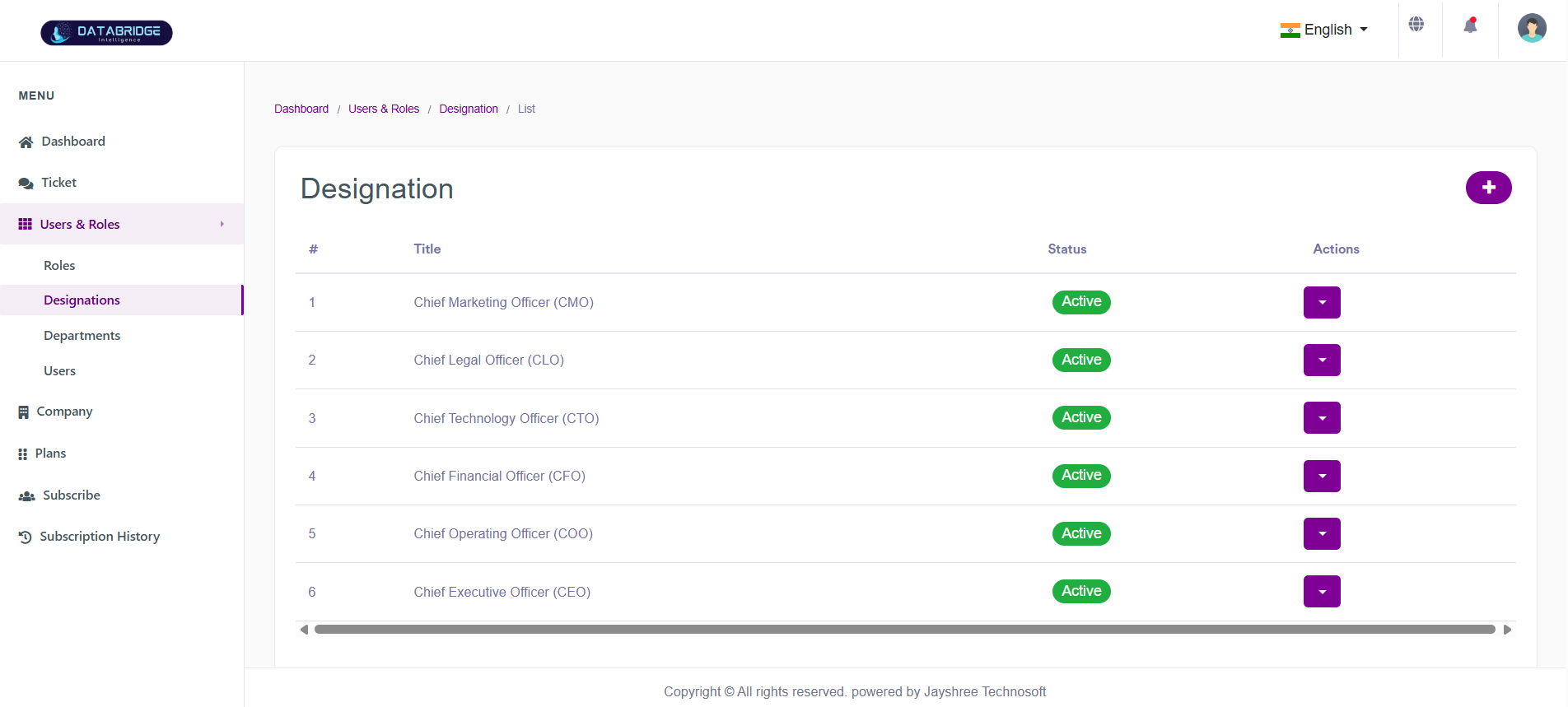
Designations:
This screen displays all employee designations available in the system. It helps in organizing users based on their job roles and responsibilities.
Features:
-List of designation titles
-Status indicator
-Action dropdown for edit/delete
-Add designation button
Functionality:
-View all designations in one place
-Add new designation
-Update or remove existing designations
-Maintain structured employee hierarchy
This screen displays all employee designations available in the system. It helps in organizing users based on their job roles and responsibilities.
Features:
-List of designation titles
-Status indicator
-Action dropdown for edit/delete
-Add designation button
Functionality:
-View all designations in one place
-Add new designation
-Update or remove existing designations
-Maintain structured employee hierarchy
1
User & Roles
2
Designations
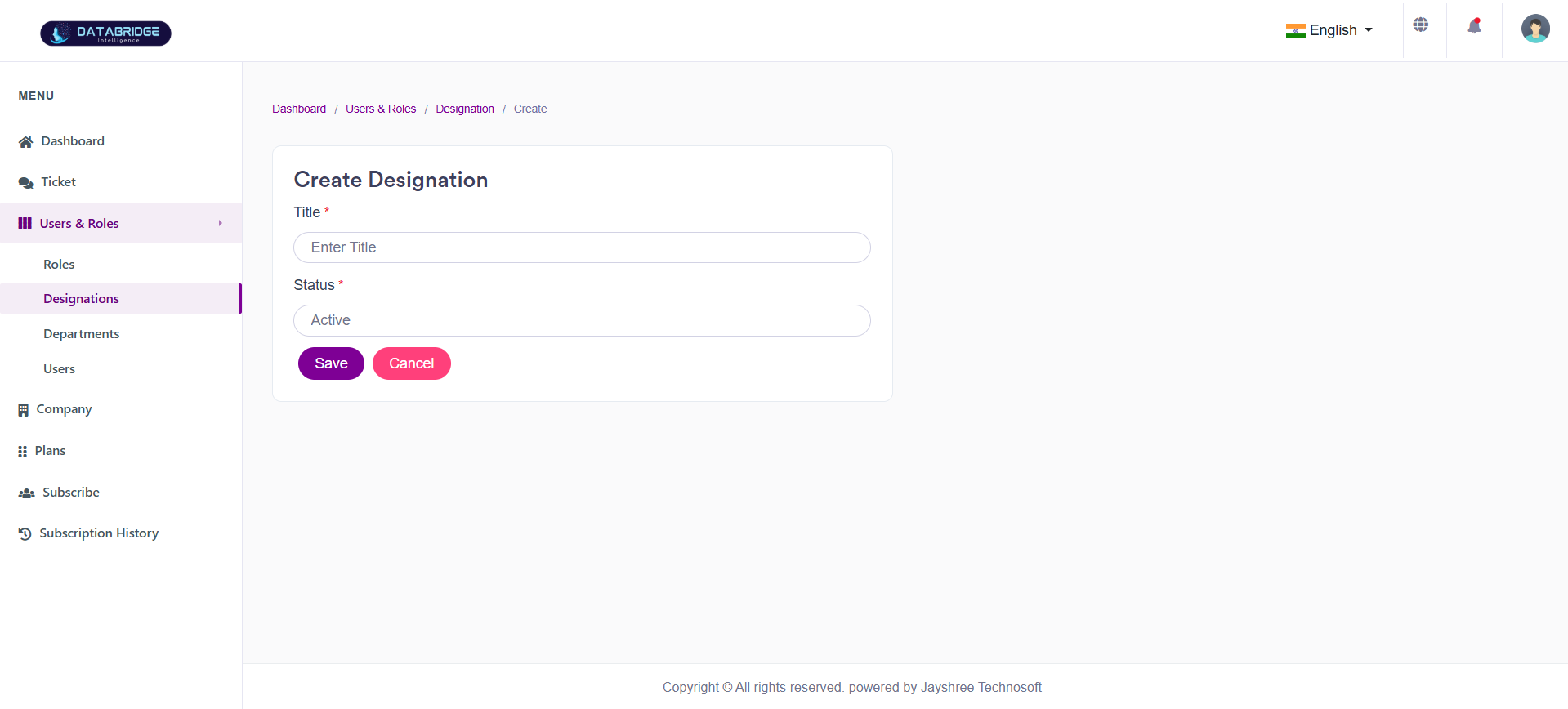
Create Designation:
This screen is used to create new designations within the organization. It helps define job roles for proper user categorization.
Features:
-Title input field
-Status selection
-Save and cancel buttons
Functionality:
-Enter designation title
-Set status (Active/Inactive)
-Save designation for use in user management
This screen is used to create new designations within the organization. It helps define job roles for proper user categorization.
Features:
-Title input field
-Status selection
-Save and cancel buttons
Functionality:
-Enter designation title
-Set status (Active/Inactive)
-Save designation for use in user management
1
User & Roles
2
Designations
3
Right"+"
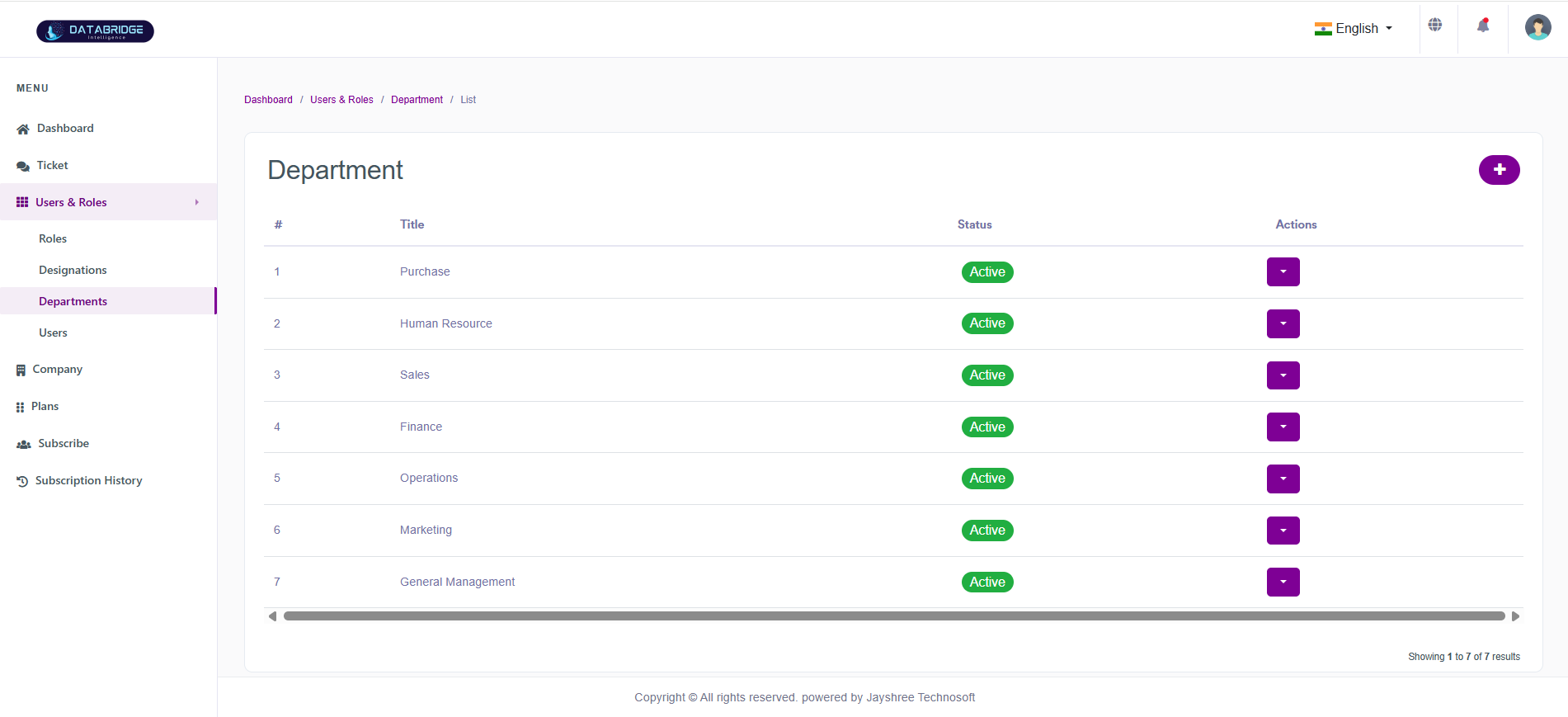
Departments:
This screen shows all departments within the organization. It helps categorize users based on their working departments.
Features:
-List of departments with titles
-Status indicator
-Action dropdown
-Add department button
Functionality:
-View department list
-Add new departments
-Edit or delete departments
-Organize users by department
This screen shows all departments within the organization. It helps categorize users based on their working departments.
Features:
-List of departments with titles
-Status indicator
-Action dropdown
-Add department button
Functionality:
-View department list
-Add new departments
-Edit or delete departments
-Organize users by department
1
User & Roles
2
Departments
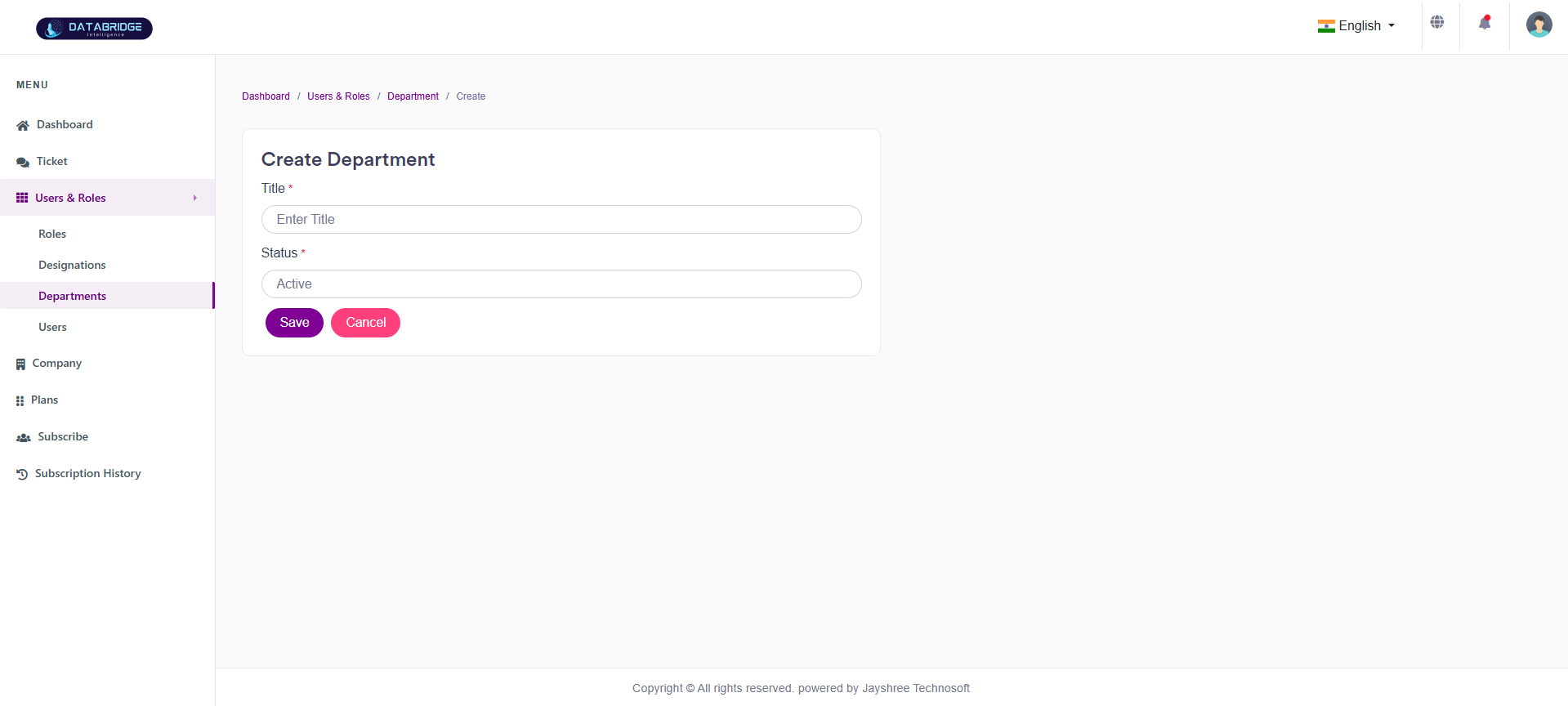
Create Department:
This screen allows administrators to create and manage departments for better organizational structure.
Features:
-Department title input
-Status selection
-Save and cancel options
Functionality:
-Add new department
-Define its status
-Save department for user assignment
-Cancel creation if required
This screen allows administrators to create and manage departments for better organizational structure.
Features:
-Department title input
-Status selection
-Save and cancel options
Functionality:
-Add new department
-Define its status
-Save department for user assignment
-Cancel creation if required
1
User & Roles
2
Departments
3
Create Department
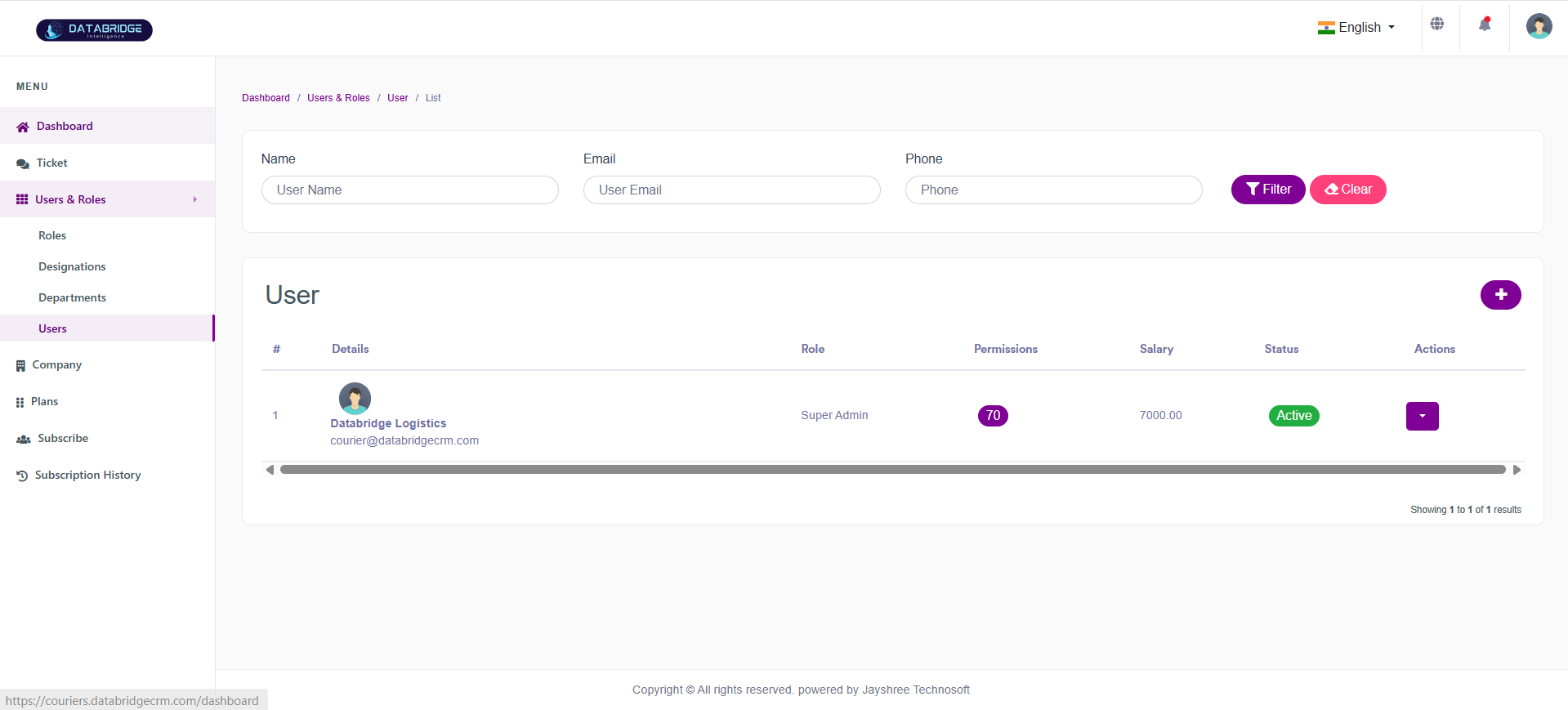
Users:
This screen displays all system users along with their roles, permissions, and status. It helps administrators monitor and manage user accounts effectively.
Features:
-User list with profile details
-Role and permission display
-Salary and status information
-Search and filter options
-Add user button
Functionality:
-View all users in tabular format
-Filter users based on name, email, or phone
-Manage user roles and permissions
-Perform actions like edit/delete
This screen displays all system users along with their roles, permissions, and status. It helps administrators monitor and manage user accounts effectively.
Features:
-User list with profile details
-Role and permission display
-Salary and status information
-Search and filter options
-Add user button
Functionality:
-View all users in tabular format
-Filter users based on name, email, or phone
-Manage user roles and permissions
-Perform actions like edit/delete
1
User & Roles
2
Users
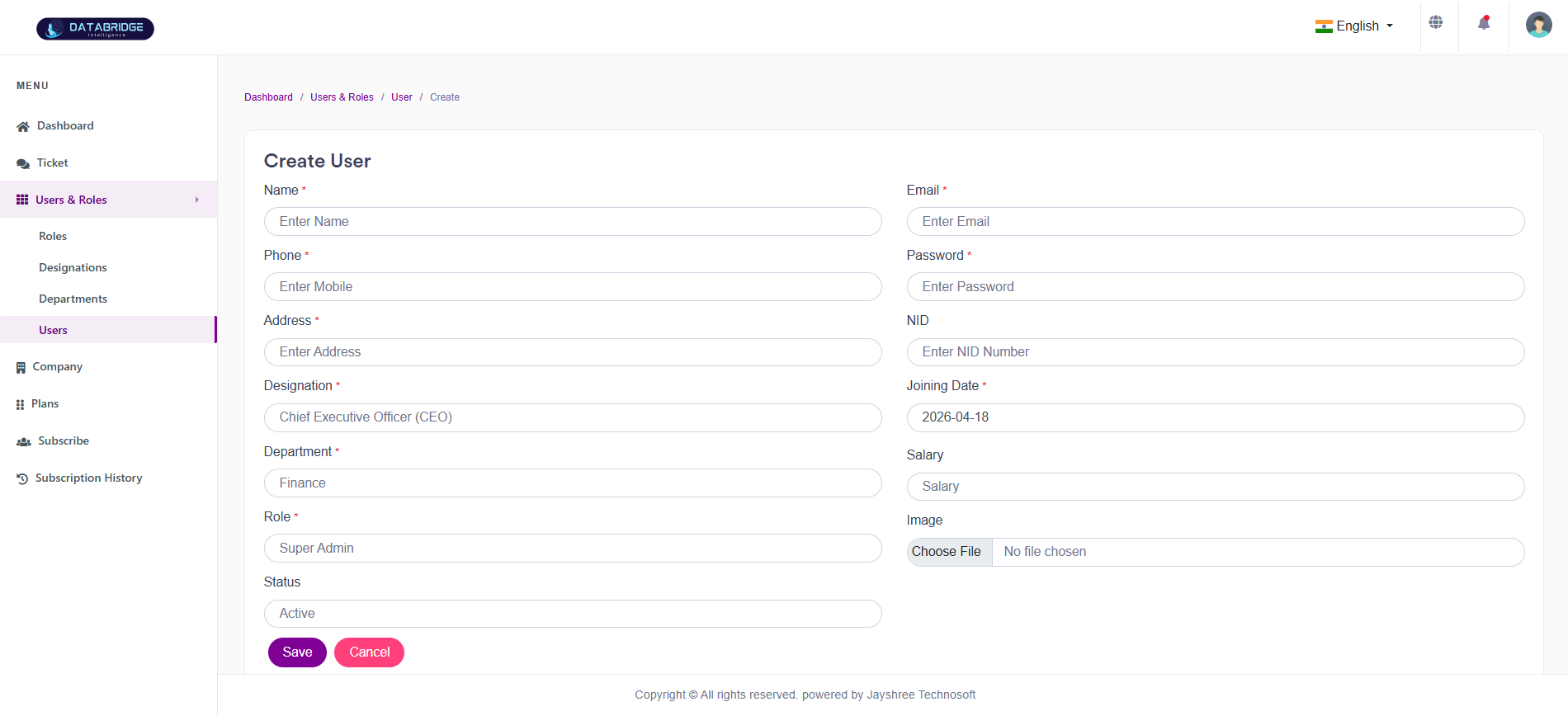
Create User:
This screen is used to add new users to the system with complete details such as personal information, role, department, and designation.
Features:
-User details form (Name, Email, Phone, Address, etc.)
-Role, Department, and Designation selection
-Salary and joining date fields
-Image upload option
-Save and cancel buttons
Functionality:
-Enter complete user information
-Assign role, department, and designation
-Upload profile image
-Save user to system
-Cancel operation if needed
This screen is used to add new users to the system with complete details such as personal information, role, department, and designation.
Features:
-User details form (Name, Email, Phone, Address, etc.)
-Role, Department, and Designation selection
-Salary and joining date fields
-Image upload option
-Save and cancel buttons
Functionality:
-Enter complete user information
-Assign role, department, and designation
-Upload profile image
-Save user to system
-Cancel operation if needed
1
User & Roles
2
Users
3
Create Users
Company
The Company module is designed to manage and maintain all company-related information within the system. It allows administrators to create, view, update, and monitor companies along with their domain configuration, subscription plans, and associated user details. This module ensures proper onboarding, organization, and control over multiple companies operating within the platform, enabling efficient tracking of their status, permissions, and service usage.
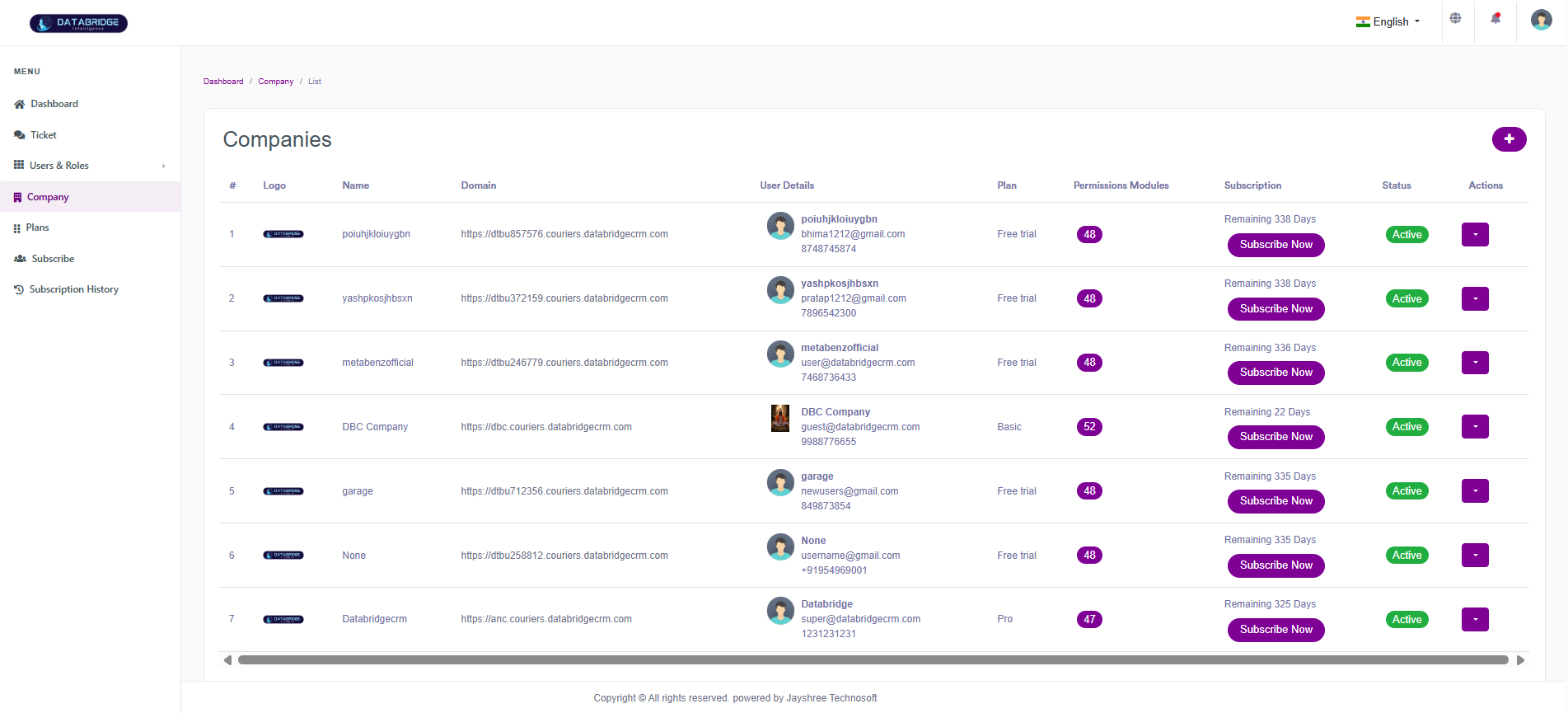
Companies:
This screen displays all registered companies within the system along with their domain, subscription details, assigned plans, and status. It helps administrators manage multiple companies and monitor their subscription lifecycle efficiently.
Features:
-Tabular list of companies with logo, name, and domain
-User details associated with each company
-Plan and permission modules count display
-Subscription status with remaining days indicator
-“Subscribe Now” action for plan activation
-Status indicator (Active/Inactive)
-Action dropdown for edit/delete operations
-Add new company button
Functionality:
-View all companies and their details in a single interface
-Monitor subscription status and remaining validity
-Assign or upgrade plans using subscription actions
-Edit or delete company records
-Manage company-level access and modules
This screen displays all registered companies within the system along with their domain, subscription details, assigned plans, and status. It helps administrators manage multiple companies and monitor their subscription lifecycle efficiently.
Features:
-Tabular list of companies with logo, name, and domain
-User details associated with each company
-Plan and permission modules count display
-Subscription status with remaining days indicator
-“Subscribe Now” action for plan activation
-Status indicator (Active/Inactive)
-Action dropdown for edit/delete operations
-Add new company button
Functionality:
-View all companies and their details in a single interface
-Monitor subscription status and remaining validity
-Assign or upgrade plans using subscription actions
-Edit or delete company records
-Manage company-level access and modules
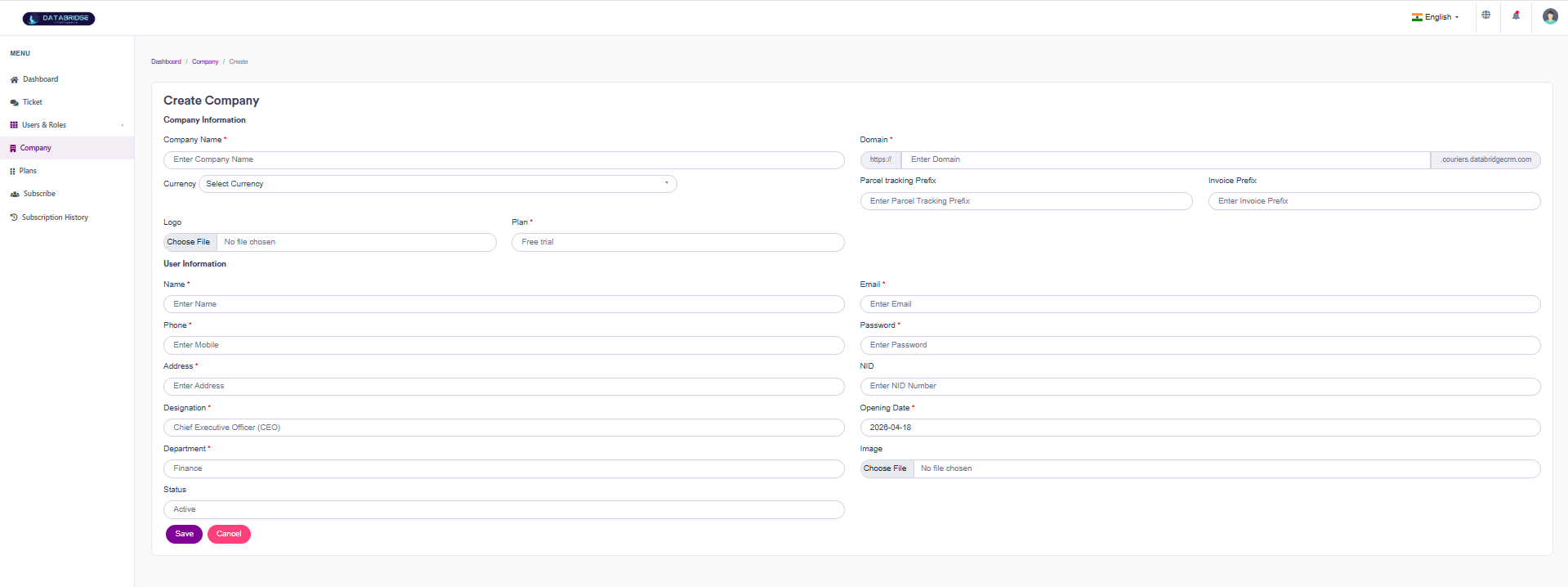
Create Company:
This screen allows administrators to create a new company profile along with its associated user details, domain setup, and subscription plan. It ensures proper onboarding of new companies into the system.
Features:
-Company information section (Name, Domain, Currency, Logo)
-Domain configuration with prefix/suffix support
-Parcel tracking and invoice prefix fields
-Plan selection dropdown
-User information section (Name, Email, Phone, Address, etc.)
-Designation and department selection
-Opening date and status selection
-Image upload option
-Save and cancel buttons
Functionality:
-Enter company details and configure domain settings
-Define tracking and invoice prefixes
-Assign subscription plan during creation
-Add primary user details for the company
-Upload logo and user image
-Save company record or cancel operation
-Ensure structured onboarding and system integration
This screen allows administrators to create a new company profile along with its associated user details, domain setup, and subscription plan. It ensures proper onboarding of new companies into the system.
Features:
-Company information section (Name, Domain, Currency, Logo)
-Domain configuration with prefix/suffix support
-Parcel tracking and invoice prefix fields
-Plan selection dropdown
-User information section (Name, Email, Phone, Address, etc.)
-Designation and department selection
-Opening date and status selection
-Image upload option
-Save and cancel buttons
Functionality:
-Enter company details and configure domain settings
-Define tracking and invoice prefixes
-Assign subscription plan during creation
-Add primary user details for the company
-Upload logo and user image
-Save company record or cancel operation
-Ensure structured onboarding and system integration
1
Company
2
Right"+"
Plans
The Plans module is used to create, manage, and organize subscription plans within the system. It allows administrators to define different service packages by setting limits such as parcel count, deliveryman capacity, duration, and pricing. Each plan can be customized with specific modules and features, enabling flexible service offerings for different companies. This module helps in controlling access levels, managing subscriptions efficiently, and supporting scalable business operations through structured plan management.
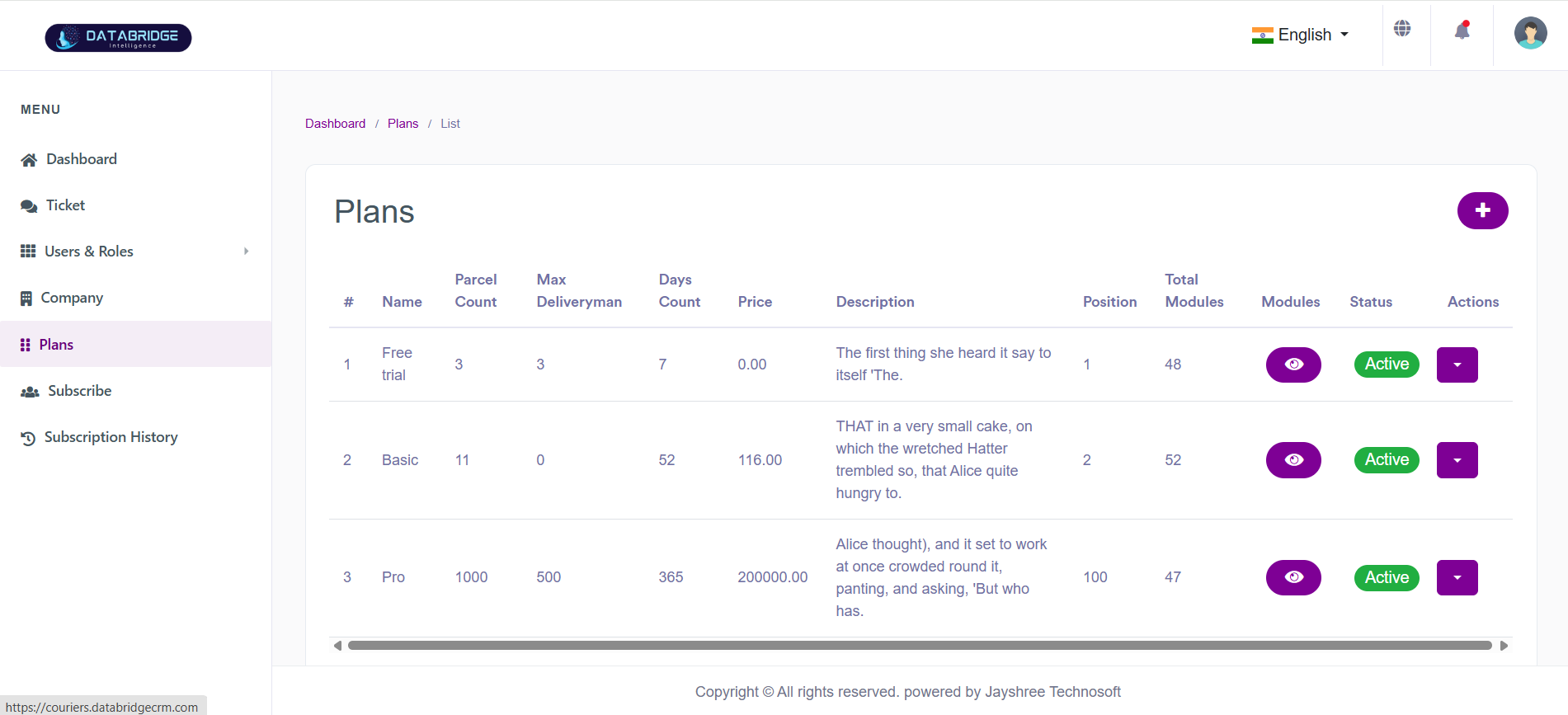
Plans List Screen:
The Plans List screen is used to manage and display all subscription plans available in the system. It provides a structured overview of plan details such as pricing, parcel limits, delivery capacity, and enabled modules. This screen helps administrators control and organize different service offerings for companies.
Features:
-Displays all available plans in a tabular format
-Shows key details like parcel count, deliveryman limit, duration, and price
-Includes plan status (Active/Inactive)
-Module visibility indicator for each plan
-Action dropdown for edit, delete, or manage options
-Add new plan button for quick navigation
Functionality:
-Admin can view complete plan details in one place
-Ability to activate/deactivate plans
-Manage plan modules and permissions
-Edit existing plans or remove unused ones
-Helps in tracking plan hierarchy using position and modules
The Plans List screen is used to manage and display all subscription plans available in the system. It provides a structured overview of plan details such as pricing, parcel limits, delivery capacity, and enabled modules. This screen helps administrators control and organize different service offerings for companies.
Features:
-Displays all available plans in a tabular format
-Shows key details like parcel count, deliveryman limit, duration, and price
-Includes plan status (Active/Inactive)
-Module visibility indicator for each plan
-Action dropdown for edit, delete, or manage options
-Add new plan button for quick navigation
Functionality:
-Admin can view complete plan details in one place
-Ability to activate/deactivate plans
-Manage plan modules and permissions
-Edit existing plans or remove unused ones
-Helps in tracking plan hierarchy using position and modules
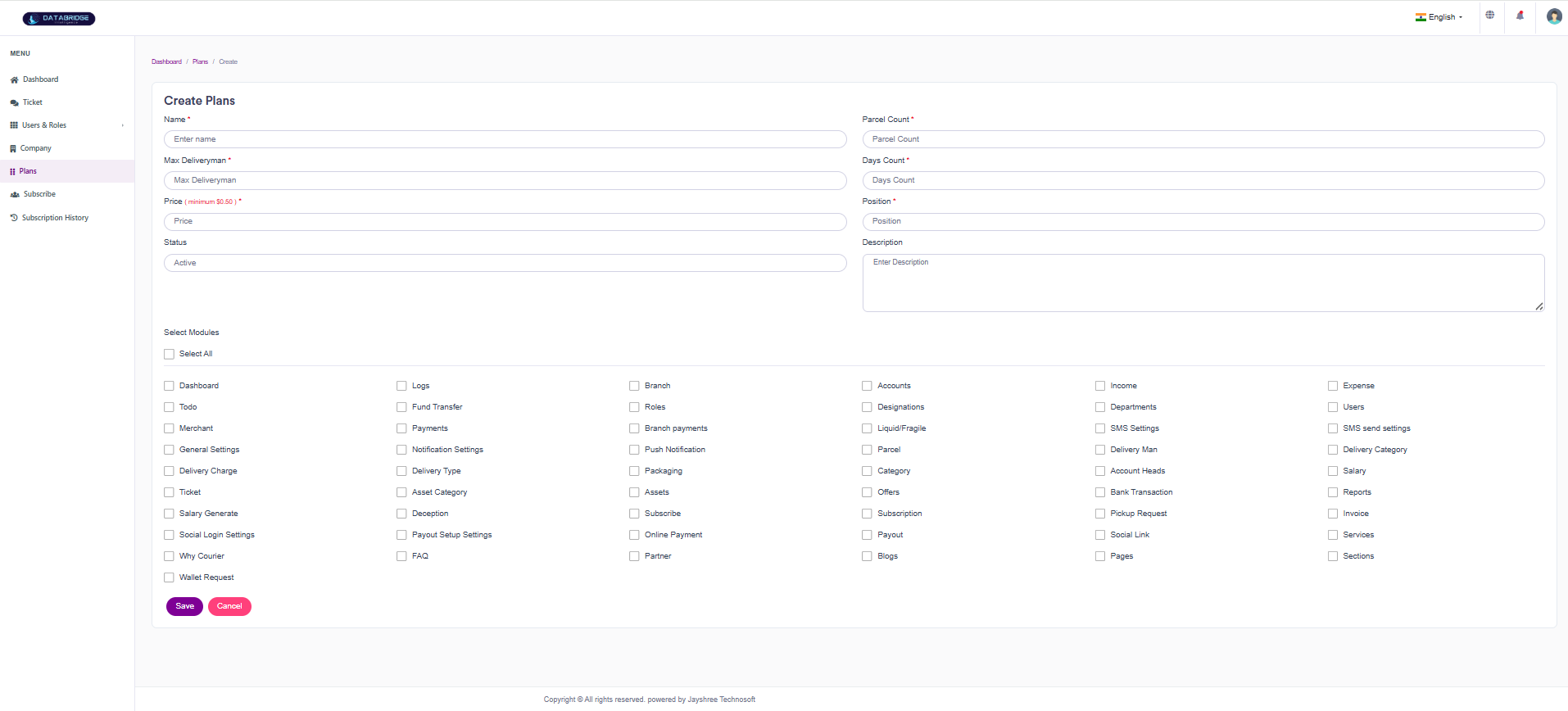
Create Plan Screen:
The Create Plan screen allows administrators to define and configure new subscription plans. It includes fields for pricing, service limits, and module access, ensuring flexible plan creation based on business requirements.
Features:
-Input fields for plan name, price, parcel count, and deliveryman limit
-Duration (days count) configuration
-Plan positioning for ordering
-Description field for additional details
-Status selection (Active/Inactive)
-Module selection with multiple checkbox options
-“Select All” option for quick module assignment
Functionality:
-Admin can create customized plans with specific limits and pricing
-Assign system modules to control feature access per plan
-Configure plan duration and usage capacity
-Save or cancel plan creation
-Enables scalable subscription model management
The Create Plan screen allows administrators to define and configure new subscription plans. It includes fields for pricing, service limits, and module access, ensuring flexible plan creation based on business requirements.
Features:
-Input fields for plan name, price, parcel count, and deliveryman limit
-Duration (days count) configuration
-Plan positioning for ordering
-Description field for additional details
-Status selection (Active/Inactive)
-Module selection with multiple checkbox options
-“Select All” option for quick module assignment
Functionality:
-Admin can create customized plans with specific limits and pricing
-Assign system modules to control feature access per plan
-Configure plan duration and usage capacity
-Save or cancel plan creation
-Enables scalable subscription model management
1
Plans
2
Right"+"
Subscribe
The Subscribe module is used to manage and track user or company subscriptions within the system. It allows administrators to monitor which plans are currently subscribed and ensures proper mapping between companies and their selected plans. This module helps maintain subscription records, supports plan activation, and plays a key role in managing service access and billing operations.
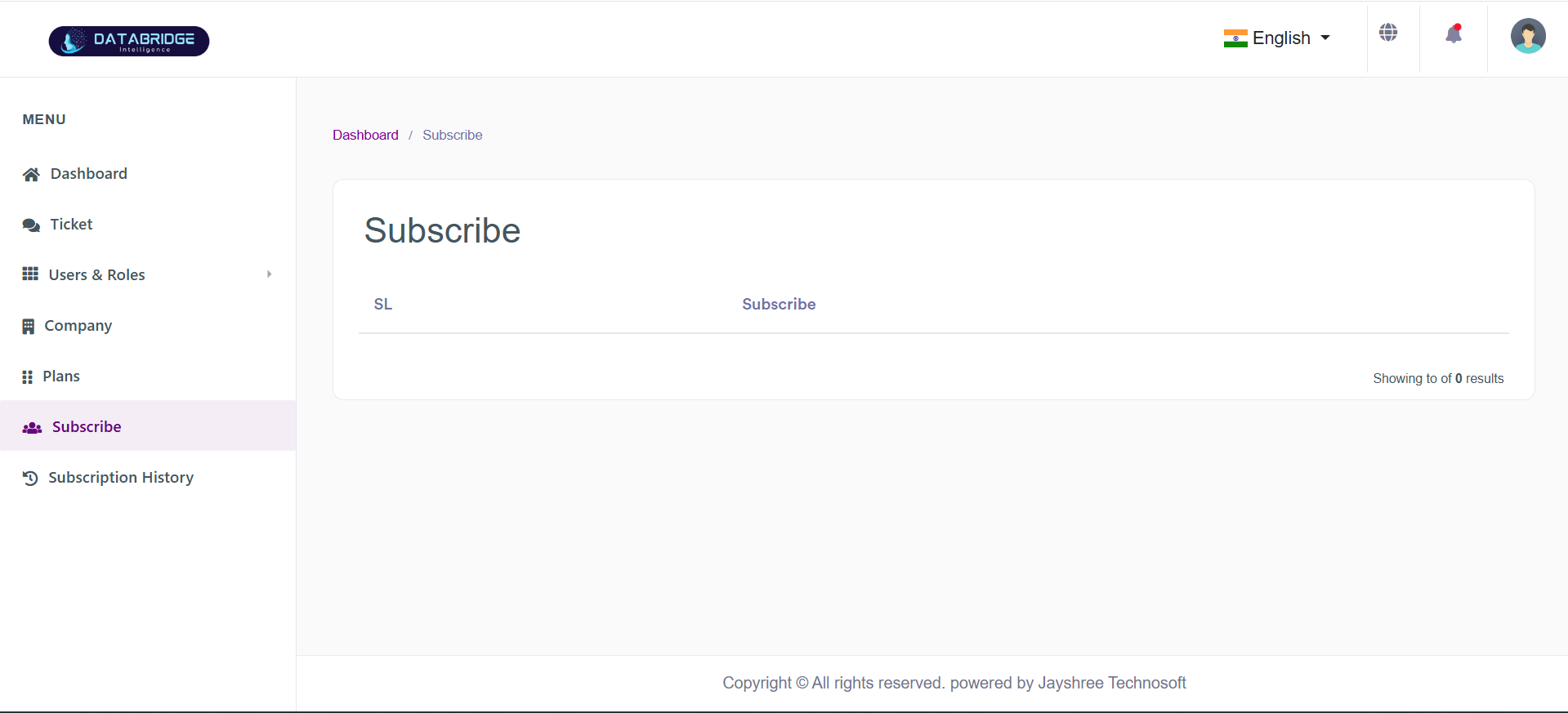
Subscribe Module:
The Subscribe screen is used to manage and view active or pending subscriptions within the system. It provides a centralized interface where administrators can track which companies or users have subscribed to available plans. This module ensures smooth subscription handling and helps monitor subscription status efficiently.
Features:
-Displays list of all subscriptions in a tabular format
-Shows subscription-related details such as plan and status
-Clean and simple interface for easy monitoring
-Integration with Plans module for subscription mapping
-Supports real-time updates of subscription data
-Empty state handling when no data is available
Functionality:
-Admin can view all active and inactive subscriptions
-Tracks which users/companies are subscribed to which plans
-Helps manage subscription lifecycle and monitoring
-Works in sync with Plans and Company modules
-Provides a foundation for billing and subscription tracking
The Subscribe screen is used to manage and view active or pending subscriptions within the system. It provides a centralized interface where administrators can track which companies or users have subscribed to available plans. This module ensures smooth subscription handling and helps monitor subscription status efficiently.
Features:
-Displays list of all subscriptions in a tabular format
-Shows subscription-related details such as plan and status
-Clean and simple interface for easy monitoring
-Integration with Plans module for subscription mapping
-Supports real-time updates of subscription data
-Empty state handling when no data is available
Functionality:
-Admin can view all active and inactive subscriptions
-Tracks which users/companies are subscribed to which plans
-Helps manage subscription lifecycle and monitoring
-Works in sync with Plans and Company modules
-Provides a foundation for billing and subscription tracking
Subscription
The Subscription History module is used to track and manage all past and current subscription records within the system. It provides detailed insights into plan usage, pricing, duration, and expiry for each company or user. This module helps administrators monitor subscription activities, analyze trends, and maintain accurate records for billing and auditing purposes.
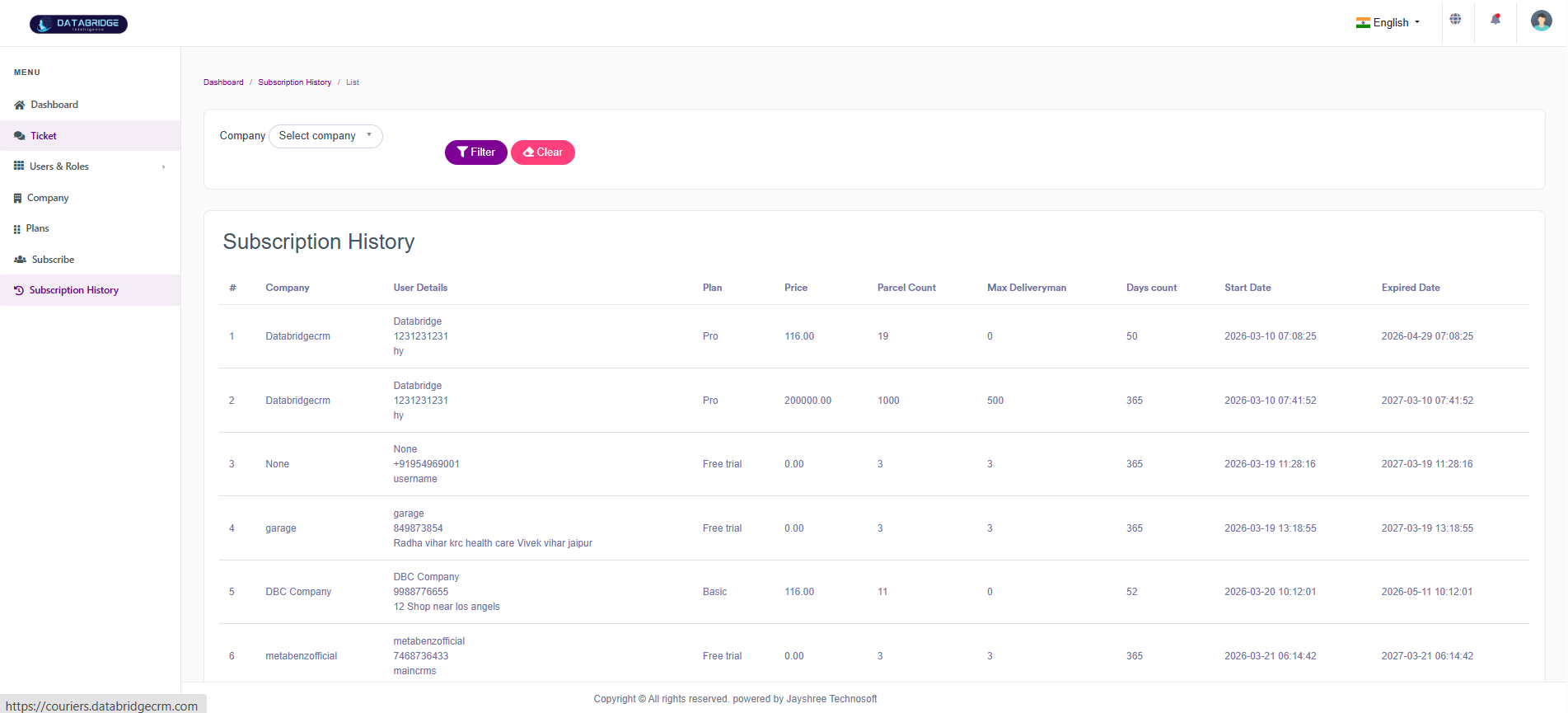
Subscription History Module:
The Subscription History screen provides a detailed record of all past and current subscriptions within the system. It allows administrators to track subscription activities such as plan selection, pricing, duration, and expiry details. This module ensures transparency and helps in auditing subscription data effectively.
Features:
-Displays subscription records in a structured tabular format
-Shows details like company, user info, plan, price, and duration
-Includes start date and expiry date tracking
-Filter option to search records based on selected company
-Clear button to reset applied filters and view full data
-Easy navigation and organized data presentation
-Supports tracking of multiple subscription entries
Functionality:
-Admin can view complete subscription history for all companies
-Tracks plan changes, renewals, and subscription durations
-Filter helps in narrowing down records for a specific company
-Clear button resets filters and reloads all records
-Enables monitoring of subscription lifecycle and billing insights
-Helps in decision-making based on historical subscription data
The Subscription History screen provides a detailed record of all past and current subscriptions within the system. It allows administrators to track subscription activities such as plan selection, pricing, duration, and expiry details. This module ensures transparency and helps in auditing subscription data effectively.
Features:
-Displays subscription records in a structured tabular format
-Shows details like company, user info, plan, price, and duration
-Includes start date and expiry date tracking
-Filter option to search records based on selected company
-Clear button to reset applied filters and view full data
-Easy navigation and organized data presentation
-Supports tracking of multiple subscription entries
Functionality:
-Admin can view complete subscription history for all companies
-Tracks plan changes, renewals, and subscription durations
-Filter helps in narrowing down records for a specific company
-Clear button resets filters and reloads all records
-Enables monitoring of subscription lifecycle and billing insights
-Helps in decision-making based on historical subscription data